


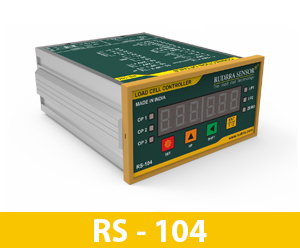
In modern weighing systems, load indicators serve as the bridge between load cells and operators or automation platforms. While the primary role of a load indicator is to display real-time weight or force readings, its true value lies in the variety of interfaces and connectivity options it offers. These interfaces not only enhance visibility but also enable advanced control, automation, and data transfer across industries.
In this blog, we’ll explore the different types of load indicator interfaces—including display features, control functions, and connectivity options such as Bluetooth, wired, and remote displays—to help you choose the right system for your application.
Why Load Indicator Interfaces Matter
Load cells generate electrical signals that need amplification, processing, and display. A load indicator does this job, but depending on its interface capabilities, it can also:
- Provide clear visual feedback through digital displays.
- Offer programmable control outputs for process automation.
- Enable connectivity with PLCs, SCADA, and mobile devices.
- Facilitate remote monitoring in challenging or hazardous environments.
The right interface ensures not just accuracy, but also ease of use, safety, and efficiency.
Types of Load Indicator Interfaces
1. Display Interfaces
The most basic and essential interface is the visual display, which shows real-time readings.
- LED Displays: Bright, suitable for indoor and outdoor environments.
- LCD Displays: Offer more detailed information, sometimes with graphical elements.
- Remote Displays: Large numeric displays visible from a distance, ideal for truck scales and crane operations.
Key Features to Look For:
- High contrast and brightness adjustment.
- Multi-unit display (kg, lb, N).
- Large digits for long-distance visibility.
2. Control Interfaces
Load indicators often include built-in control functions that integrate with machinery and processes.
- Programmable Relays: Trigger alarms, stop feeders, or control batching operations.
- Setpoints and Thresholds: Allow automation when a load exceeds or drops below a defined value.
- Tare, Zero, and Calibration Functions: Simplify operations for users in industrial settings.
Example: In a batching system, the indicator can automatically cut off material flow once the desired weight is reached, ensuring precision.
3. Connectivity Interfaces
Modern load indicators are not standalone devices—they are designed for connectivity. Depending on your application, you can choose from:
a) Wired Connections
- RS232/RS485: Traditional serial communication for PLCs and computers.
- Analog Outputs (0–10 V, 4–20 mA): Standard in industrial automation.
- Ethernet: High-speed data transfer and easy integration with SCADA systems.
Advantages: Reliable, secure, and stable over long distances.
b) Wireless / Bluetooth Connectivity
- Enables real-time monitoring via mobile apps or tablets.
- Eliminates the need for long cable runs.
- Suitable for portable or remote weighing applications.
Advantages: Mobility, convenience, and reduced installation cost.
c) Remote Displays and IoT Integration
- Large secondary displays installed at different locations in the facility.
- IoT-enabled indicators can connect via Wi-Fi, GSM, or cloud-based platforms, enabling remote access and data analytics.
Advantages: Centralized monitoring, Industry 4.0 readiness, and predictive maintenance.
Applications of Different Interfaces
- Manufacturing: Wired outputs for PLC integration in automated lines.
- Construction: Remote displays for crane operators and safety supervisors.
- Logistics and Transport: Bluetooth-enabled indicators for mobile tracking of loads.
- Food & Pharma: Ethernet or digital interfaces for compliance and traceability.
Choosing the Right Load Indicator Interface
When selecting an indicator, consider:
- Environment: Harsh outdoor vs. controlled indoor settings.
- Distance: Short vs. long transmission requirements.
- Integration Needs: Compatibility with existing automation systems.
- User Convenience: Ease of display visibility and remote monitoring options.
Conclusion
The effectiveness of a weighing system is not determined solely by the load cell—it is the load indicator interfaces that make the system user-friendly, automated, and connected. From bright LED displays and programmable control outputs to Bluetooth, Ethernet, and remote displays, modern indicators are designed to meet the evolving demands of industrial and commercial applications.
By choosing the right interface combination, businesses can achieve real-time monitoring, seamless automation, and enhanced operational efficiency, ensuring that their weighing systems are future-ready.